Live demo: https://ghc-vis-ds.hamalainen.dev
Source: https://github.com/carlohamalainen/ghc-vis-ds
Discourse: https://discourse.haskell.org/t/ghc-vis-ds-a-modern-port-of-ghc-vis-with-a-datastar-frontend/14520
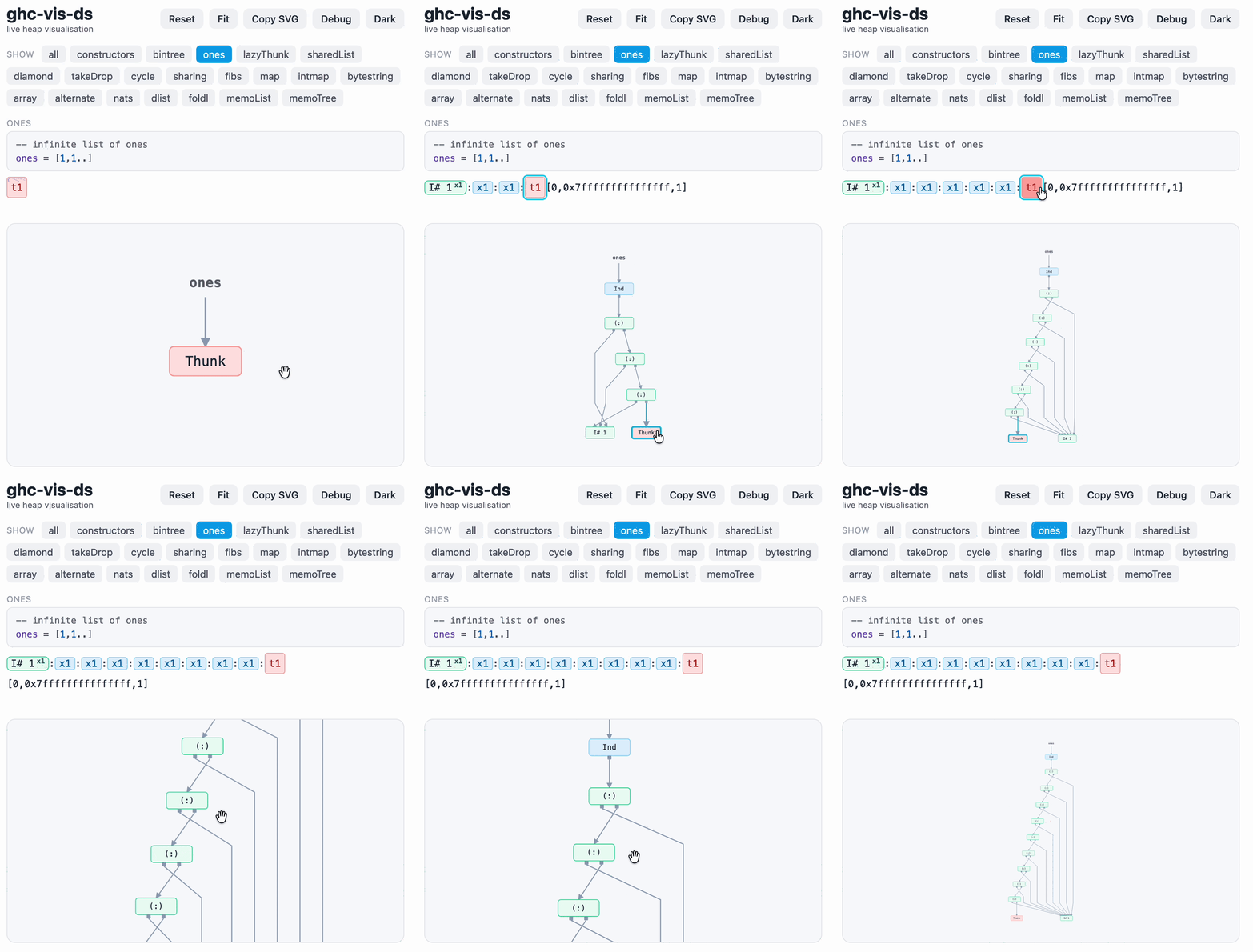
A live view of the GHC heap in your browser: inspect values in a running GHCi session and click thunks to force them.
ghc-vis-ds is a port of ghc-vis with a Datastar front end and no system-library dependencies. A system with a fresh install of GHC (e.g. ghcup) can build and run this package.
Why Link to heading
The heap behavior of a lazy program is somewhat opaque, given just the source code.
For example, let xs = [1..] allocates a single thunk; length xs never returns; and whether two
expressions share one heap object can depend on subtle details about the compiler.
Space leaks are notoriously difficult to diagnose and fix.
Joachim Breitner’s ghc-heap-view decodes live heap closures from a running program. Dennis Felsing’s ghc-vis builds on it, drawing the closures from a GHCi session and forcing a thunk when you click on it. But ghc-vis renders through gtk2hs and svgcairo, which have become hard to build on recent GHC.
ghc-vis-ds keeps the ghc-vis heap model and replaces the GTK/Cairo/Graphviz rendering stack with a browser: the server uses a Hypermedia approach with datastar-hs to create most of the user interface. The browser does the rendering.
Usage Link to heading
git clone https://github.com/carlohamalainen/ghc-vis-ds
cd ghc-vis-ds
cabal repl lib:ghc-vis-ds --repl-options=-fobject-code
ghci> import GhcVisDs
ghci> startVis                    -- serve on http://127.0.0.1:5005
ghci> let xs = [1..] :: [Int]
ghci> view xs "xs"                -- show it in the browser
ghci> update                      -- refresh after forcing something
ghci> loadExamples                -- or bring up the worked-example gallery
Click a thunk (a red node) in either the list view or the graph view to force it one step. Shift-click forces it deeply. On the public demo, shift-click is capped to conserve resources.
Values render best under -fobject-code (see make repl); plain GHCi
byte-compiles them and the heap graph fills up with BCO noise.
The TypeScript is compiled and committed as web/graph.js, embedded into the
binary with Template Haskell, so building and using the Haskell side needs no
Node, pnpm, or JS toolchain. CI builds and tests on Ubuntu across GHC 9.6.7,
9.8.4, 9.10.3, 9.12.4 and 9.14.1.
How it works Link to heading
The server renders HTML and pushes it over a single Server-Sent Events stream; Datastar attributes on the markup provide the interactivity.
The page shell Link to heading
The static page is a handful of empty containers plus a few Datastar attributes. Everything else arrives over the stream.
<body data-signals="{highlight: -1, dark: false, debug: false}"
      data-class:dark="$dark">

  <!-- toolbar -->
  <button data-on:click="window.__ghcvis?.copySvg()">Copy SVG</button>
  <button data-on:click="$debug = !$debug" data-class:active="$debug">Debug</button>
  <button data-on:click="$dark = !$dark" data-text="$dark ? 'Light' : 'Dark'"></button>

  <!-- opens the SSE stream on load; the server patches the list view in here -->
  <div id="main" data-init="@get('/live')">loading...</div>

  <!-- the TypeScript draws the ELK-laid-out graph in here -->
  <div id="ghcvis-graph"></div>

  <!-- debug/raw panels, shown only while $debug is set -->
  <div id="ghcvis-debug-panel" data-show="$debug"></div>
  <div id="ghcvis-raw-panel"   data-show="$debug"></div>

  <!-- push the current highlight into the SVG whenever it changes -->
  <div data-effect="window.__ghcvis && window.__ghcvis.highlight($highlight)"></div>

  <!-- keepalive so the hosted worker process is not reaped mid-session -->
  <div data-on-interval__duration.30s="@post('/alive')"></div>
</body>
The list view Link to heading
src/GhcVisDs/Render/List.hs is under 100 lines, and uses lucid2 to emit the HTML:
renderThunk :: (Monad m) => Text -> HeapGraphIndex -> HtmlT m ()
renderThunk n idx =
  button_
    [ class_ "ghcvis-thunk"
    , title_ "click: force; shift-click: force deeply"
    , anchor idx
    , hover idx
    , highlight idx
    , data_ "on:click" $ "@post('/force-index?i=" <> tshow idx <> "&deep=' + (evt.shiftKey?1:0))"
    ]
    (toHtml n)

anchor :: HeapGraphIndex -> Attributes
anchor idx = makeAttributes "id" ("ghcvis-" <> tshow idx)

highlight :: HeapGraphIndex -> Attributes
highlight idx = makeAttributes "data-class:ghcvis-hl" ("$highlight === " <> tshow idx)

hover :: HeapGraphIndex -> Attributes
hover idx =
  makeAttributes "data-on:mouseenter" ("$highlight=" <> tshow idx)
    <> makeAttributes "data-on:mouseleave" "$highlight=-1"
That is the entire interaction model for the list view.
The graph view Link to heading
src/GhcVisDs/Render/Graph.hs serializes the heap graph to JSON so that we can pass the graph to elkjs for layout (this is how we avoid a local Graphviz dependency). The graph is drawn in “immediate mode” as SVG by web/graph.ts.
const attrs: Record<string, string> = {
  class: isRoot ? "ghcvis-node ghcvis-superroot" : `ghcvis-node kind-${node.kind}`,
  "data-node": c.id,
};
if (!isRoot) {
  attrs["data-on:mouseenter"] = `$highlight=${node.id}`;
  attrs["data-on:mouseleave"] = "$highlight=-1";
  // click forces to WHNF; shift-click forces everything heap-reachable
  attrs["data-on:click"] =
    `@post('/force-index?i=${node.id}&deep=' + (evt.shiftKey?1:0))`;
}
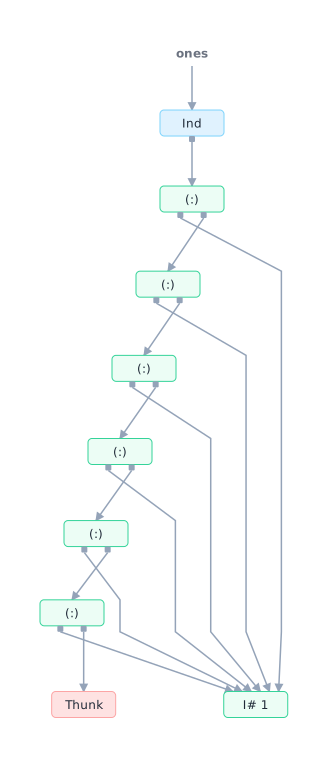
Here is the ones = [1,1..] example after a few
forcing steps, straight out of the Copy SVG button:
The highlight signal Link to heading
Datastar watches the SVG content of a page so by adding the same mouse hover and click attributes, we get seamless integration between the list and graph views. Nice!
<!-- list view, from Render/List.hs -->
<button class="ghcvis-thunk"
        data-on:mouseenter="$highlight=42"
        data-on:mouseleave="$highlight=-1"
        data-class:ghcvis-hl="$highlight === 42"
        data-on:click="@post('/force-index?i=42&deep=' + (evt.shiftKey?1:0))">…</button>

<!-- graph view, from graph.ts -->
<g class="ghcvis-node kind-thunk" data-node="n42"
   data-on:mouseenter="$highlight=42"
   data-on:mouseleave="$highlight=-1"
   data-on:click="@post('/force-index?i=42&deep=' + (evt.shiftKey?1:0))">…</g>
Hovering either one writes $highlight=42. The list rows react through
data-class (a CSS class toggles on the match). The graph reacts through the
data-effect bridge on the shell, which calls into the SVG code.
Datastar attributes Link to heading
| Attribute | Where | What it does |
|---|---|---|
data-signals | <body> | Declares the client signals: highlight, dark, debug. |
data-init | #main | Runs once on load; @get('/live') opens the SSE stream. |
data-on:click / data-on:mouseenter / data-on:mouseleave | buttons, list items, graph nodes | Either mutate a signal ($highlight=…, $dark = !$dark) or fire a backend action (@post('/force-index?…')). |
data-on-interval__duration.30s | shell | Fires @post('/alive') every 30s to keep the hosted worker alive. |
data-class:<name> | many | Toggles a class from an expression: data-class:dark, data-class:active, data-class:ghcvis-hl. |
data-text | dark-mode button | Sets the element’s text ('Light' / 'Dark'). |
data-show | debug/raw panels | Shows/hides on $debug. |
data-effect | shell | Re-runs whenever its signals change; here it re-highlights the SVG when $highlight changes. |
data-ignore-morph | source <pre> | Keeps the syntax-highlighted source out of morph patches so highlight.js output is not clobbered on re-render. |
@get / @post are Datastar backend actions. The server answers them over
SSE with two kinds of event: patchElements (morph new HTML into the DOM
by id) and executeScript (run a line of JS on the client).
How data flows Link to heading
The server sends list HTML and graph JSON; layout and drawing happen in the browser.
- Load.
#main’sdata-init="@get('/live')"opens one long-lived SSE connection to/live. - Render loop (on connect, then after every heap change):
- Build the list view HTML and
patchElementsit into#main. - Serialize the heap graph to JSON and
executeScriptwindow.__ghcvis.render(<json>). - In the browser,
render()builds an elkjs graph,awaitselk.layout(...)for node/edge coordinates, then the TypeScriptdraw()emits the<svg>into#ghcvis-graph. - Patch the notice, debug table, and raw dump panels.
- Build the list view HTML and
- Interact. Hover sets
$highlight→ the other view responds (above). Clicking a thunk@posts/force-index; the server forces that closure, flags an update, and the render loop wakes and repaints everything.
The layout step is why ELK runs client-side through executeScript.
Porting ghc-vis Link to heading
The three core modules of ghc-vis
(GHC.Vis.Types,
GHC.Vis.View.Common, and
GHC.Vis.Internal)
have been copied almost verbatim, apart from
removing anything tied to GTK or Cairo. A few compile issues on modern GHC
were straightforward to resolve with CPP macros. There are a few minor bugfixes and improvements.
To avoid a dependency on ghc-heap-view we implemented the HeapGraph type
and the related generalBuildHeapGraph function with some modifications;
see src/GhcVisDs/HeapGraph.hs.
What is new here is the front end: warp and datastar-hs on the server, lucid2 for the list view, and elkjs plus some TypeScript for the graph.
Not supported Link to heading
History (ghc-vis’s HistorySignal (Int -> Int)) for stepping back and forth
through previous heap states is not implemented.
Other tools Link to heading
ghc-vis-ds is best used for experimentation and learning. For production issues one would turn to ghc-debug. It suits whole-program memory investigation (snapshots, heap censuses, tracking down leaks); ghc-vis-ds is for watching individual values evaluate.
The text UI ghc-debug-brick is also very useful.
Credit Link to heading
ghc-vis-ds builds on Dennis Felsing’s ghc-vis and Joachim Breitner’s ghc-heap-view.
Joachim Breitner’s talk Thunks, Sharing, Laziness: The Haskell Heap Visualized is a great demo of ghc-vis.
Thanks to Datastar for the hypermedia approach and elkjs for graph layout.
Comment form pending Cloudflare verification...
Loading comments…